PLS ANALYTICS & REPORTING

See the whole operation. Then go deeper.

Explore 15 reporting areas and 98 report views and metric groups, from investigation volumes to payroll and outsourced-service profitability.

REAL DASHBOARDS & REPORTS

18 actual analytics & reporting screens.

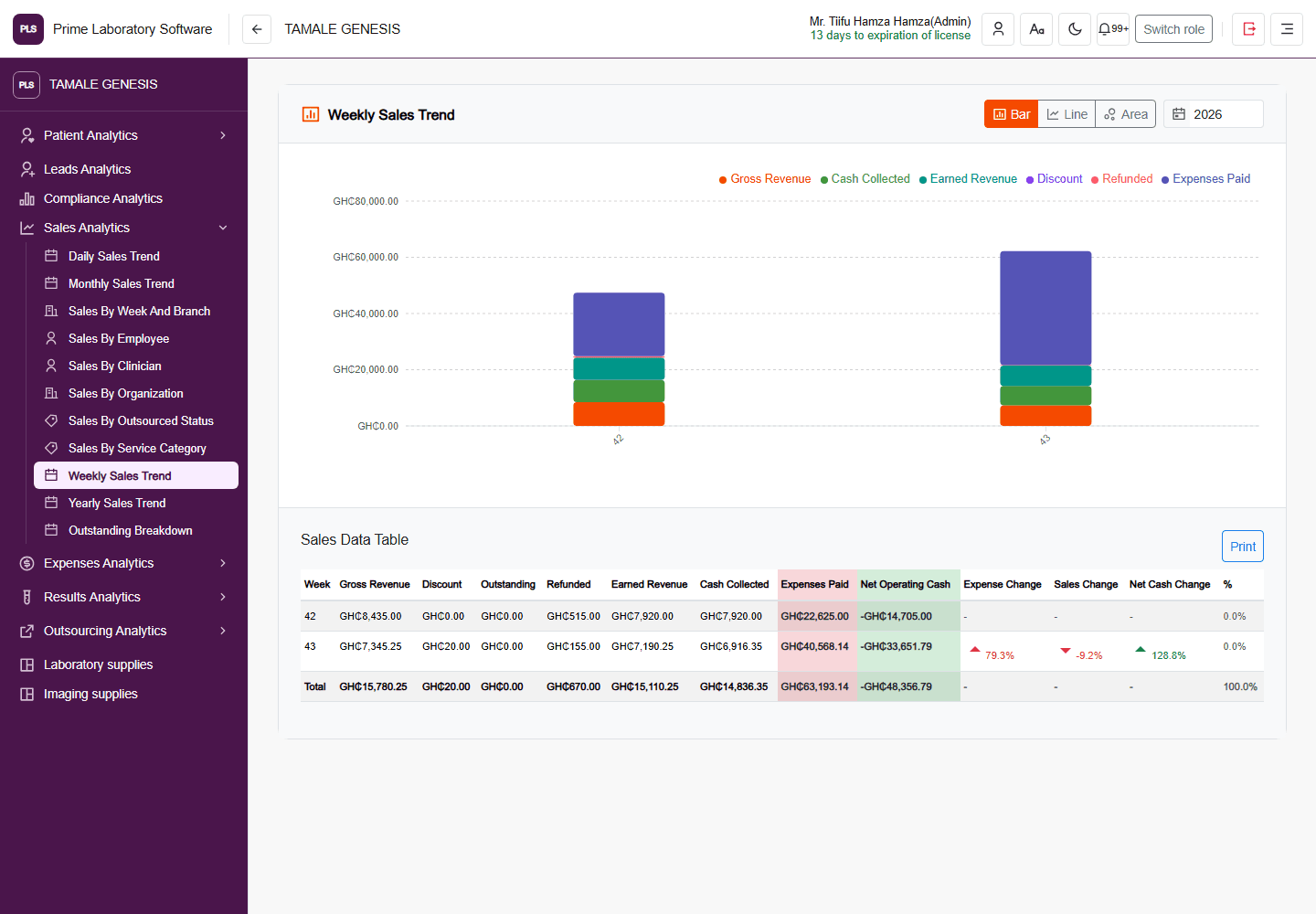
Inspect sales charts, test-volume analysis, patient demographics, outsourcing, expenses, payroll, commissions, pharmacy and inventory. These are unchanged demo-page captures, with the original application header, navigation and displayed values—not invented charts.

Browse every reporting area

Screenshots illustrate selected available reporting pages, not every report listed below. Full-size originals are available in the viewer.

THE REPORTING DEPTH BEHIND THE DASHBOARDS

15 areas. Detailed reports, not just totals.

Choose an area to see the report views and metric groups present in the current software.

View the capability catalog
01Clinical reporting

Test volume & result analysis

Follow investigation volumes and inspect the recorded values behind the workload.

  • Yearly test counts by test and month
  • Monthly case totals
  • Active case days & average cases per day
  • Hourly case drilldowns
  • Positive / negative result categories
  • Field-value counts & buckets
  • Numeric field minimum & maximum
See the actual dashboard
02Financial reporting

Sales, revenue & collections

Distinguish billed activity, earned revenue and actual collections instead of treating them as one number.

  • Daily, weekly, monthly & yearly trends
  • Gross & earned revenue
  • Cash collected
  • Discounts & refunds
  • Expenses paid & net operating cash
  • Clinician service counts & collection rate
  • Employee, organization & service-category breakdowns
See the actual dashboard
03Financial reporting

Outstanding payments & aging

See where unpaid balances sit and drill into the records behind them.

  • Total outstanding
  • Patient & transaction balances
  • Service-category breakdowns
  • Branch & organization balances
  • Aging buckets
  • Top debtors
  • Billing-versus-service reconciliation
See the actual dashboard
04Financial reporting

Outsourcing activity & profitability

Review outsourced service volume, recorded outsourcing costs and profit by period or facility.

  • Outsourced amounts
  • Recorded profit amounts
  • Service counts
  • Share of total activity
  • Facility breakdowns
  • Hourly through yearly views
See the actual dashboard
05Financial reporting

Expense analysis

Inspect recorded spending across periods and the employees, categories and merchants involved.

  • Monthly expenses paid
  • Expense counts & average amount
  • Unique employees
  • Share of monthly spend
  • Daily through yearly summaries
  • Category, employee & merchant reports
See the actual dashboard
06Clinical reporting

Patient demographics & data quality

Understand the patient population and identify gaps in registration data.

  • Age-range counts
  • Gender & marital-status distributions
  • Registration trends
  • Total & active patients
  • Missing email, mobile & middle name
  • Contact completeness
See the actual dashboard
07People reporting

Clinician & referral performance

Connect clinician activity and referral relationships to recorded financial performance.

  • Cases managed
  • Service cost & sales
  • Withholding tax
  • Referral cases & unique patients
  • Billed revenue
  • Accrued commissions
08People reporting

Acquisition pipeline & follow-ups

Keep prospect progress and relationship follow-up visible in the current CRM workspace.

  • Prospect pipeline stages
  • Clinician / organization prospect types
  • Follow-ups due today & overdue
  • Reminder counts
  • First-referral & handover status
  • Relationship-attention categories
09Financial reporting

Commission analytics

Review commission obligations and recorded payments across periods and recipients.

  • Total paid, due & waived
  • Payment percentage
  • Average paid
  • Period & status breakdowns
  • Recipient payment efficiency
See the actual dashboard
10Supply reporting

Inventory, custody & procurement

See company-owned stock, where it is held, what it costs to use, and what needs attention.

  • Inventory value & stock health
  • Low / out-of-stock and active item counts
  • Value by custody & category
  • Consumption & wastage costs
  • Reorder watchlist
  • Movement, usage & valuation reports
  • Procurement, suppliers & payment timing
  • Batch expiry & item histories
See the actual dashboard
11People reporting

Payroll & workforce analytics

Bring payroll spending, staffing and compensation distributions into one reporting workspace.

  • Financial KPIs & headcount
  • Payroll-period metrics
  • Compensation & earnings distributions
  • Attendance & compliance
  • Leave statistics & utilization
  • Allowances, bonuses & deductions
  • Overtime & top earners
See the actual dashboard
12Supply reporting

Pharmacy sales, margins & stock

Review pharmacy-specific sales, profitability and supply reports separately from laboratory operations.

  • Net sales & refunds
  • Book gross profit & operating profit
  • Stock at cost & medicine counts
  • Reorder & out-of-stock counts
  • Sales & margin reports
  • Expiry, purchasing & suppliers
  • Stock movements
See the actual dashboard
13Clinical reporting

Imaging activity

Review recorded ultrasound and imaging workload by modality, date and staff member.

  • Cases with results
  • Ultrasound case counts
  • Staff involved
  • Cases worked by user
  • Modality breakdown
  • Daily case volume
14Clinical reporting

Physical samples & specimen reports

Follow physical samples, review decisions and rejection communication records.

  • Physical Sample Summary
  • Sample status counts
  • Review-request decisions
  • Rejection communication & delivery statuses
  • Selected-period record counts
  • Collection & container details
  • Sample audit history
15Clinical reporting

Incident & compliance analytics

Make incident workload, escalation and resolution patterns easier to inspect.

  • Total & open incidents
  • Average resolution time
  • Escalation rate
  • Type, severity & status breakdowns
  • Monthly trends
  • Location & employee breakdowns
  • Regulatory-reporting incidents