Disconnected hand-offs
Paper trails and separate tools make everyday work harder to follow.
Explore one configurable laboratory platform for patient registration, specimen workflows, results, billing, inventory and business oversight.
| BARCODE / SAMPLE | TEST PANEL | COLLECTION | STATUS |
|---|---|---|---|
| SYN-0261-014SYNTHETIC SAMPLE | Full blood count | Facility | Received |
| SYN-0261-015SYNTHETIC SAMPLE | Malaria rapid test | Home collection | Collected |
| SYN-0261-016SYNTHETIC SAMPLE | Urinalysis | Facility | Review |
Every day, patient details, specimens, results, payments and supplies move between people. When those steps live in disconnected tools, it takes more effort to understand what's happening.
PLS brings essential laboratory workflows together, so teams can follow work with greater clarity and managers can review operational activity in context.
Get to know PLSPaper trails and separate tools make everyday work harder to follow.
Charges, collections and outstanding balances can be difficult to review together.
Without a useful view of stock movement, teams may spot supply issues late.
Operational questions take longer when the underlying information is spread out.
Explore the building blocks of a laboratory operation—from front desk to finance.
From registration and specimen reception to authorized reports, payments and stock oversight—PLS supports the operational work around your laboratory services.
Explore all capabilities 13 CAPABILITIESCapture demographics, visits and orders as the start of an organized laboratory workflow.
Track barcode lookup, collection, receipt, review, recollection and specimen audit history.
Structure results, critical alerts, authorization, payment-gated printing and delivery preferences.
Coordinate clinician consultations, orders, result workflows and commission records within configured access boundaries.
Connect billing, payment collection, refunds, NHIS claim-check workflows and receivables review.
Maintain item and supplier records with stock movement and selected alerts.
Manage ledgers, journals, statements, periods, close and bank statement matching workflows.
Coordinate compensation, attendance, leave, deductions, payroll periods and commission batches.
Review workload, revenue, inventory and outstanding balances from configured data.
Support quality control, device calibration, incidents, analytics and audit records.
Assess analyzer and healthcare connections against each device and interface.
Coordinate service areas, staff, billed orders, assignment and collection status.
Organize configured ultrasound waiting lists, report templates and image uploads.
The right setup depends on your facility's requirements and the systems around it.
Analyzer and external-system connections depend on the device, available protocol, integration scope and facility validation. Compatibility is not universal.
Access to patient and operational information depends on approved roles, deployment configuration and each facility’s governance requirements.
Requirements review, configuration, training and readiness are part of implementation planning. Scope and timing are agreed with each organization.
Switch between workspace views built with synthetic values—not a live customer system—to see how the workflow holds together.
The current registration flow is organized around personal information, address, emergency contact, then photo and credentials.
Illustrative workflow map based on current PLS capabilities. Not a live screenshot.| REFERENCE | REQUESTED PANEL | REGISTRATION | STATUS |
|---|---|---|---|
| SYN-REG-041SYNTHETIC | Full blood count | New visit | Draft |
| SYN-REG-042SYNTHETIC | Malaria rapid test | New visit | In progress |
Illustrative workflow structure · Synthetic IDs, states & amounts · Not a live screenshot
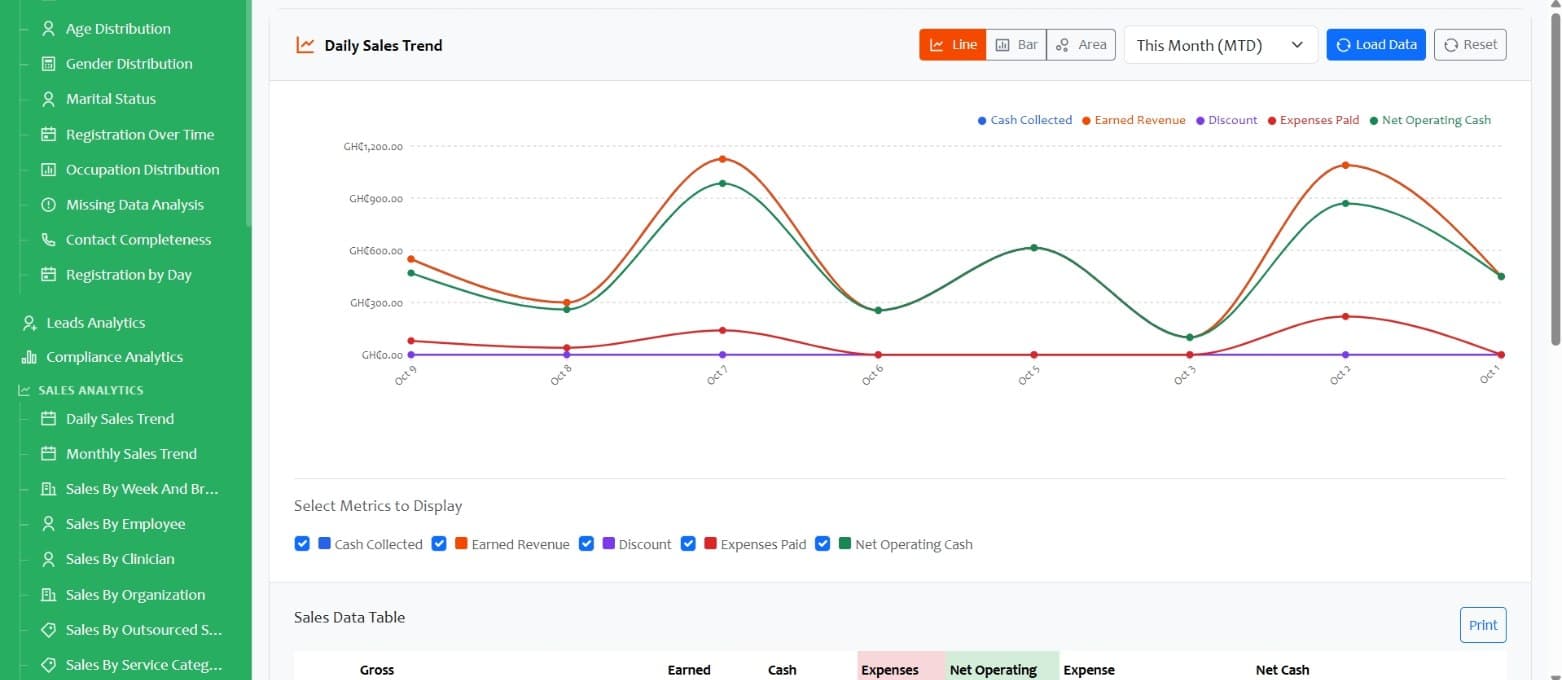
Switch between chart types, choose a reporting period and control which financial measures appear together.
Answer three short questions. We’ll suggest a sensible first conversation—not a fixed package, price or implementation promise.
Bring clarity to the hand-offs between the people who register, process, review and manage laboratory work.
Different environments have different priorities. Start with the setting closest to yours.
Explore participating laboratories and their approved public profiles, published tests and services. Catalogs appear only after facility approval and publication.
Get a clear picture of requirements, roles and next steps before making a commitment.
Understand the facility, services and operating priorities.
Map current workflows, roles, data and integration needs.
Explore the relevant workflows using synthetic examples.
Agree scope, responsibilities, setup and implementation approach.
Prepare users and operational processes for the planned launch.
Coordinate transition and ongoing assistance with the facility.
Implementation scope and timing are agreed after requirements assessment.
We believe useful conversations start with transparent expectations.
We assess each instrument individually. Compatibility depends on the exact model, supported protocol, available interface and configuration.
No. Facility access and patient results are separate journeys, and authentication stays in the approved application—not on this marketing website.
A conversation can focus on the workflows most relevant to your facility, using illustrative examples and synthetic values.
Once your software request is approved and payment is confirmed, PLS provisions your online workspace in five minutes so you can sign in and navigate the software. This is the software provisioning period. Facility configuration, data migration, integrations and training follow the agreed implementation scope.
Tell us how your facility works today. We'll help you explore whether PLS is a fit.